


Microsoft Bing Search
4.558.20K Reviews
App Specs
- Version
- Varies with Device
- Updated On
- License
- Free
- Downloads
- 100,000,000+
- Developer
- Microsoft Corporation
- Categories
- Tools
- Platform
- Android, iOS
Screenshots
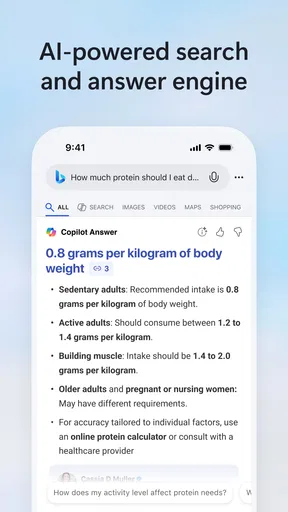


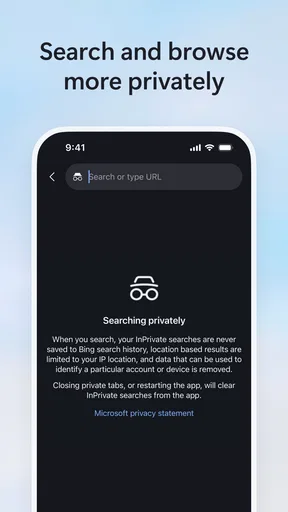

 Analysis by AppCompare
I see Microsoft Bing Search as a useful second search app rather than an automatic replacement for whatever you already use. Its strongest case is the mix of typed, voice, and camera-based searching in one place. That can make everyday lookups easier, especially when you do not know the right words to describe what you are looking at. The trade-off is that an all-in-one feel does not guarantee that every feature will suit every user, and I would still compare results with another search engine when accuracy matters.
How Bing fits into everyday searching
The first thing I noticed after downloading the Microsoft Bing Search app was how sleek and user-friendly the interface is. The layout is clean, and everything seems to be right where you expect it to be. Setting it up was a breeze, and within a few minutes, I was ready to dive into the world of Bing.
One of the coolest features is the personalized homepage. It feels like it knows me better each time I use it. Whether it's showing me the latest news articles or trending topics, the homepage is dynamic and keeps me in the loop with what's happening around the globe.
That start screen is also a matter of taste. I like having current topics available when I open a search app, but if I only want a blank box and a quick answer, a homepage with news and trends can feel like extra visual noise. I would treat it as a useful starting point, not as a replacement for a dedicated news reader: the subjects that catch my eye there are prompts to explore, while a focused news app is better when I want to follow a story in depth.
Visual search when words are not enough
Now, here’s a feature that really stands out—Visual Search. You can use your camera to search for whatever catches your eye. Just snap a photo, and Bing will do the rest. I tried it with a plant I have at home, and it instantly gave me a rundown of what it was. It's like having a pocket-sized encyclopedia with you at all times.
Besides identifying objects, Visual Search also works for landmarks, animals, and even fashion items. It’s especially handy when you’re traveling or shopping and want instant information without typing a single word. Pretty cool, right?
The practical advantage is not that a camera can settle every question, but that it gives you a starting point when a name or spelling is unknown. If I see an unfamiliar plant on a walk, for example, a photo can help me find likely matches and then search those names for care advice. I would not rely on a visual match alone for a safety decision, such as deciding whether a wild plant is edible; image results are a lead to verify, not expert confirmation.
Worth Reading Before You Choose

Flipboard Shows What News Apps Must Do Beyond the Feed

Switching to Android Auto Means Rethinking Your Driving Routine

Google Calendar Makes a Crowded Week Easier to Manage

Ludo King Makes the Most of the Minutes Between Plans

Baby Panda World Brings Quick Play to Modern Phones, but Its Game Library Feels Busy

ESPN’s Live Game View Makes Following Close Games Easier
For better results, I would frame one clear subject rather than a busy scene. A clean photo of the object is more useful than including several similar items, signs, and background details at once. This is a small change in how you use the feature, but it makes visual search feel more like a deliberate query instead of a guess. If the first match seems off, I would retake the image from a different angle or switch to a short text search describing what I can see.
Voice, translation, and situations on the move
These days, we're all about convenience, and Bing doesn't disappoint. The voice search feature is spot-on and understands my commands without a hitch. It’s perfect for those moments when you're on the go and need quick answers without tapping away on your screen.
And let's not forget the translation feature. It's a lifesaver when you're trying to communicate in another language or looking to translate text on the fly. The app supports multiple languages, making it a must-have tool for travelers or language enthusiasts.
I find voice search most useful for a short, direct question when my hands are occupied, such as checking a term while cooking or looking up a place before setting off. It is less appealing for private queries in a quiet room with other people nearby, and speech recognition can be inconvenient when names are unusual or background noise gets in the way. In those cases, typing gives me more control over the wording and makes it easier to correct a detail before searching.
Translation has a similarly practical role: it can help me understand a sign, phrase, or short piece of text while travelling, but I would not treat an instant translation as polished writing or a substitute for careful interpretation. For an important message, I would check the wording and context before sending it. A dedicated translation app may be a better choice if translation is the main task and I need a focused workflow; Bing makes more sense when I want translation alongside general search.
A realistic day out shows how these tools can complement each other. I might use voice search to check the opening details for a place, point Visual Search at an unfamiliar landmark to learn what it is, then translate a short sign or menu phrase. None of those steps makes Bing a travel planner or a guaranteed authority, but keeping several kinds of lookup together can save me from switching between separate apps for quick questions. For reservations, directions that need careful checking, or time-sensitive decisions, I would still verify the details with a dedicated source.
Rewards and the Microsoft connection
Another perk of using the app is the Microsoft Rewards program. Every search earns you points which can be redeemed for gift cards or donations to charity. It’s a nice little incentive that makes using the app feel rewarding in more ways than one.
The app also integrates seamlessly with other Microsoft services like OneDrive and Office, ensuring you have all your essentials just a tap away. It's like having a mini Microsoft ecosystem in your pocket.
Rewards are best understood as a small bonus, not as the reason to change a search habit. I would not make extra searches just to collect points: that turns a handy tool into unnecessary screen time, and the value of any reward depends on what is available to the individual user. If I already use Microsoft services, the ecosystem connection may be convenient; if my files and documents live elsewhere, that part of the appeal matters much less.
In practical terms, I would keep the search app for finding information and open Office or OneDrive when I actually need to work with a document or file. The connection is most useful when Microsoft tools are already part of my routine, rather than a compelling reason by itself to move an entire workflow. People who prefer a platform-neutral setup may be happier with a search app that does not place Microsoft services so prominently in their everyday choices.
Privacy, family use, and sensible limits
In a world where privacy concerns are growing, Bing offers solid security features. You have control over what data is collected and can customize your privacy settings to ensure you're comfortable with how your information is used. It's reassuring to know that your searches and data are handled with care.
The app also includes safe search filters to help protect against inappropriate content, which is especially useful if you have kids using your device.
I appreciate having settings to review, but I would not treat a filter as a complete substitute for adult supervision or device-level controls. Search filtering can reduce exposure to unsuitable results, while children may still benefit from age-appropriate guidance about evaluating webpages and not sharing personal details. If a device is shared, it is worth checking the settings directly rather than assuming one person’s preferences automatically suit everyone who uses it.
Privacy-conscious users should take a few minutes to look through the controls and decide what feels comfortable before making the app their default. That is more useful than relying on broad assurances, because the right balance depends on how someone uses search and what they are willing to personalize. I see this as an area where the app offers choices, but the user still needs to make them deliberately.
Where it stands against other search options
Compared with a basic browser search box, Bing’s most noticeable distinction is the set of ways to ask: text, voice, and images sit alongside a changing homepage, translation, and Rewards. That breadth is helpful if I often move from identifying something to researching it, or if I want quick lookups without opening several specialist apps. A conventional search app may feel cleaner if all I want is a simple query field and minimal extras.
There is no single best search engine for every question. Results can vary between services, and an answer that looks convincing still deserves checking when the stakes are high. For a broad comparison, I sometimes search the same phrase elsewhere, especially when I need a second perspective or want to find a particular site. Bing works well as a daily option, but I would not assume that its first result is always the most complete or the most relevant.
It is also not the right tool for every adjacent task. A dedicated maps app is more suitable for navigating a route, while a specialist camera or translation tool may offer a more focused experience for someone who uses that function all day. Bing’s strength is convenience across common lookups, not replacing every specialist app. I would install it for that range, then keep alternatives for jobs where depth and purpose-built controls matter more.
Who should give it a try
Microsoft Corporation publishes this free tools app, which is rated for Everyone. It has a 4.6 average from around 1.7 million ratings and has been installed over 100 million times, so it is clearly familiar to a large audience. Those figures tell me that it is widely used, not that it will be the perfect fit for every search style. The app also offers in-app purchases, with listed item prices ranging from $9.99 to $199.99; I would check what a purchase covers before spending, rather than assume the core search experience requires payment.
I would recommend trying Bing if you want a general search tool with image and voice input, enjoy seeing current topics on a homepage, or already use Microsoft services. It is especially appealing to curious users who frequently encounter things they cannot name and want an easy route from a photo to more information. The app is also a reasonable option for families who want a search filter available, provided they understand that settings work alongside—not instead of—good supervision.
I would skip it, or at least keep it as a secondary option, if my priority were the quietest possible interface, if I strongly preferred another search engine’s results, or if I needed a dedicated tool for maps, translation, or managing files. People who dislike personalized feeds may find the homepage less useful than a plain search screen. And anyone who rarely uses camera or voice search may not get much value from those distinguishing features.
Final thoughts
In conclusion, the Microsoft Bing Search app offers a refreshing alternative to the usual search engines. With its intuitive design, innovative features like Visual Search, and strong privacy controls, it's definitely worth a try.
Whether you're a tech enthusiast or someone looking for a reliable search tool, this app has something for everyone. So why not give it a spin? You might just find yourself pleasantly surprised.
My recommendation is more specific: give it a try if you will actually use more than a text box, particularly camera search, voice queries, or the Microsoft connection. Keep another search option available for comparison, and verify important answers instead of treating any one engine as definitive. For me, Bing’s appeal is practical breadth; its main drawback is that someone who wants only bare-bones searching may see the extra elements as clutter rather than convenience.
Pros
- Seamless integration with Microsoft services.
- Comprehensive search results with filters.
- Voice search feature for hands-free use.
- Personalized news feed based on interests.
- Rewards program for regular users.
Cons
- Occasional slow performance on older devices.
- Limited customization for interface settings.
- Ads can be intrusive at times.
- Voice search may misinterpret commands.
- Requires Microsoft account for full features.
FAQs for Microsoft Bing Search
What are the main features of the Microsoft Bing Search app?
The Microsoft Bing Search app offers a variety of features including a powerful search engine with voice search capabilities, daily wallpaper updates, and local recommendations. It also provides quick access to news, weather updates, and trending topics. Additionally, it integrates with Microsoft services and offers rewards for using the app.
Is Microsoft Bing Search app free to use?
Yes, the Microsoft Bing Search app is completely free to download and use on both Android and iOS platforms. While it offers a range of features at no cost, users will need a Microsoft account to earn rewards through its rewards program. There are no in-app purchases or subscriptions required.
How does the Bing Rewards program work?
The Bing Rewards program allows users to earn points by using the Bing Search app for their searches. Points can be redeemed for various rewards, such as gift cards or charitable donations. To participate, users must sign in with a Microsoft account and follow the instructions to start earning points with each search.
Can I customize the Bing Search app interface?
Yes, the Bing Search app offers several customization options. Users can personalize their homepage with different themes and background images, choose their preferred news topics, and manage their search history settings. These features enhance the user experience by allowing personalization to suit individual preferences.
How does Bing Search ensure user privacy and security?
Microsoft Bing Search prioritizes user privacy and security by implementing robust data protection measures. It allows users to manage their search history and configure privacy settings. Additionally, the app employs encryption and other security protocols to safeguard user data. Users can access detailed privacy policies through the app.


